

Your backend constantly asks the database for the same data, you’re wasting resources and slowing things down. Whether you’re using NestJS, there’s a simple trick to improve performance: enable caching in TypeORM.
In this guide.
- 🧠 What caching
- ⚙️ How to set up TypeORM cache
- 🔄 How to cache dynamic queries
- 🧹 How to clear the cache when needed
- 💡 When caching is helpful — and when it’s not
🧠 What is Caching?
Think of caching like short-term memory for your app.
📖 Simple Analogy:
You walk into a coffee shop and say:
“I’d like a cappuccino coffee with almond milk and one sugar.”
The ___ makes it and gives it to you. But she also writes down your order on a sticky note.
The next day, you walk in and say:
“Same as yesterday.”
She looks at the note and gives you your coffee instantly.
That’s 🧠 caching:
Instead of redoing the work, your app remembers the result and serves it faster.
🧱 Technical Version
Let’s say you’re building an API that returns product details.
const cache = {};

async function getProduct(slug: string) {
  if (cache[slug]) {
    return cache[slug]; // ✅ Already saved
  }

  const product = await fetchFromDatabase(slug);
  cache[slug] = product; // Save for next time
  return product;
}- First call: Gets from DB and caches it.
- Next call: Instantly serves from memory.
Now let’s see how to do this in TypeORM or othere BE.
⚙️ How to Enable TypeORM Cache
To enable query caching in TypeORM, you only need one config block.
export const AppDataSource = new DataSource({
  type: 'postgres',
  host: 'localhost',
  port: 5432,
  username: 'user',
  password: 'pass',
  database: 'mydb',
  entities: [User, Movie],
  synchronize: true,
  cache: {
    duration: 60000, // Cache duration in ms (60s)
  },
});
🧪 Built-in Cache Types:
'database': Stores cache in a special table.'redis': Fast, production-friendly caching.'ioredis': For ioredis client.'mongodb': Use MongoDB as a cache store.'memory': Stores cache in-memory (default if not specified).
✅ Basic Query Caching Example
Let’s say you want to cache a list of featured movies:
const movies = await AppDataSource
  .getRepository(Movie)
  .createQueryBuilder('movie')
  .where('movie.isFeatured = true')
  .cache(true)
  .getMany();
🔄 Caching Dynamic Queries (with Custom Keys)
In the real world, users apply filters like:
- Genre =
"Action" - Language =
"Hindi" - Year =
2022
That means your query changes based on filters.
So, your cache key must also change — or you’ll return the wrong data!
✅ Solution: Build dynamic keys
interface MovieFilters {
  genre?: string;
  language?: string;
  year?: number;
}

async function getFilteredMovies(filters: MovieFilters) {
  const { genre, language, year } = filters;

  const qb = AppDataSource.getRepository(Movie)
    .createQueryBuilder('movie')
    .where('movie.isActive = true');

  if (genre) {
    qb.andWhere('movie.genre = :genre', { genre });
  }

  if (language) {
    qb.andWhere('movie.language = :language', { language });
  }

  if (year) {
    qb.andWhere('movie.year = :year', { year });
  }

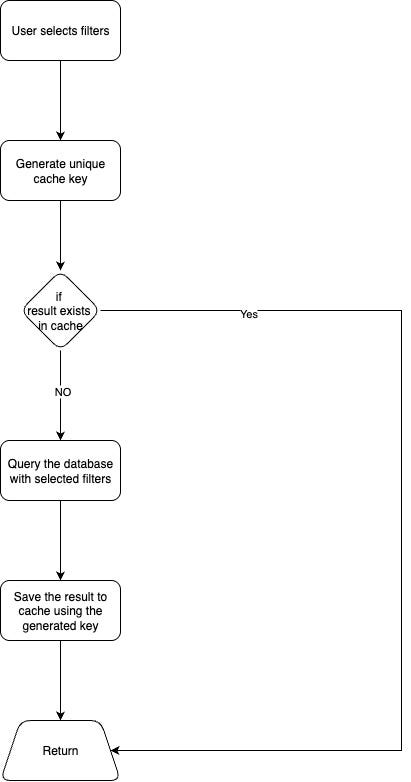
  const cacheKey = `movie_cache_${genre ?? 'all'}_${language ?? 'all'}_${year ?? 'all'}`;

  const movies = await qb
    .cache(cacheKey, 60000)
    .getMany();

  return movies;
}
Now, each filter combination has a unique cache key, which ensures the correct results are stored and served.
🔁 Visual Flow of Caching
🧹 Clearing Cache
You might want to clear the cache after updates or when filters change drastically.
await AppDataSource.queryResultCache?.clear();Clear a specific cache key:
await AppDataSource.queryResultCache?.remove(['movie_cache_Action_Hindi_2022']);📦 Optional: Use Redis for Caching
For large apps, in-memory caching is not enough. You can use Redis with TypeORM.
cache: {
  type: 'redis',
  options: {
    host: 'localhost',
    port: 6379,
  },
  duration: 60000,
}
❓ When to Use Cache (and When Not To)
✅ Use it for:
- Homepage data (e.g., trending content)
- Lists that don’t change every second
- Expensive queries with joins
- Read-heavy APIs
❌ Avoid caching:
- Real-time dashboards
- Highly user-specific or sensitive data
- Frequently changing records (e.g., live scores)
💡 Tips
- Use unique cache keys for dynamic queries.
- Don’t over-cache — use realistic durations (30s–5min).
- Consider using Redis in production.
- Always clear cache after important updates.
🎯 Conclusion
Caching with TypeORM is one of the easiest ways to improve your app’s performance.
With just .cache() and a few smart keys, you can:
- 🚀 Speed up API responses
- 🧠 Reduce database load
- 😎 Deliver a smoother user experience
Whether you’re using NestJS, it works the same way
So next time you’re building a backend — remember:
If it doesn’t change often, cache it
Thank you for reading! 😊
Stay connected and stay updated on the latest trends in technology by connecting with me on LinkedIn.
For more insightful articles and updates, feel free to visit my Medium profile.
Happy coding and keep innovating! 🚀



Leave a Reply